



Overview
This article explains how to view device deployments in OneDeploy, including deployments that are currently in progress and deployments that have already completed.
When should I use this?
Use this section to:
- Monitor the progress of a device build
- Review the outcome of a completed deployment
- Investigate deployment status or results for a specific device
How to view device deployments
In the navigation pane, expand Deployment.
- Click Deployments.
The Device Deployment tab opens and displays a list of device deployments.

Understanding the Device Deployment list
The Device Deployment list shows both completed deployments and deployments that are currently in progress.
Each row represents a single deployment and includes information such as:
- When the deployment started
- The Organisation the device belongs to (useful when running in Multi-tenant Mode)
- The device and device name
- The build that was applied
- Current status and phase
- Percentage complete
- The final result (for completed deployments)
You can use this view to quickly identify:
- Deployments that are still running
- Deployments that completed successfully
- Deployments that require further investigation
Viewing deployment details
To view more information about a specific deployment:
- Click a deployment in the list.
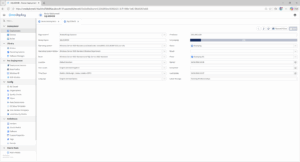
A detailed view opens showing additional information, including:
- Device and Organisation details
- Operating system and build information
- Deployment status and phase
- Start time and latest update
- The most recent deployment message
This view is useful for monitoring progress while a deployment is running or reviewing what happened after a deployment has completed.
Connectivity and deployment reporting
Deployment progress information depends on connectivity between the device being built and the OneDeploy cloud.
- If the device has connectivity to the OneDeploy cloud, deployment progress and status updates are shown in the Device Deployment views.
- If connectivity is not available (for example, in air-gapped or heavily firewalled environments), progress information may not be shown.
Important:
Lack of connectivity back to the OneDeploy cloud does not affect the deployment itself.
- Builds continue as normal and without error.
- Devices can be built completely offline.
- Deployment reporting and progress visibility are provided as a convenience only.
If telemetry is disabled, progress and status information may also be limited or unavailable.
What happens next?
Once a deployment completes, its final status and result remain available in the Device Deployment list for review.
You can return to this section at any time to review historical deployments or monitor new ones as they start.
Common questions
Why don’t I see progress updates for a deployment?
The device may not have connectivity to the OneDeploy cloud, or telemetry may be disabled.
Does a lack of connectivity cause deployments to fail?
No. Deployments continue as normal and can complete successfully even when fully offline.
Can I review deployments after they have finished?
Yes. Completed deployments remain visible in the Device Deployment list.
Related articles
- Devices
- Builds