
Home Logo logo
  • The OneDeploy Platform
    • Build vs. Image: The Deployment Revolution
    • Scalability and Performance
    • Remote Sites: Deployment without border
    • A Unified Deployment Platform
  • About OneDeploy
  • For MSP’s
  • News and Events
    • Unleashing the Latest Version at Microsoft Ignite 2025
    • Why we killed the image
    • How a London Stadium Recovered from the CrowdStrike Outage in Time for a Concert
  • Support and Resources
    • Videos
    • Documentation
  • Contact
Book a Demo
  • The OneDeploy Platform
    • Build vs. Image: The Deployment Revolution
    • Scalability and Performance
    • Remote Sites: Deployment without border
    • A Unified Deployment Platform
  • About OneDeploy
  • For MSP’s
  • News and Events
    • Unleashing the Latest Version at Microsoft Ignite 2025
    • Why we killed the image
    • How a London Stadium Recovered from the CrowdStrike Outage in Time for a Concert
  • Support and Resources
    • Videos
    • Documentation
  • Contact

Introduction

3
  • What is OneDeploy?
  • Concepts and Planning
  • Getting Started – Technical Onboarding

Using OneDeploy

43
  • Config
    • Windows Autopilot – Getting Started
    • Windows Autopilot Integration – OneDeploy Steps
    • Windows Autopilot Integration – Microsoft Entra
    • Organisations – Summary
    • My Tenant
  • Deployment
    • Builds
    • Devices
    • Deployments
    • Builds
      • Build General Settings
      • Builds Overview
      • Configuring the Operating System(s) for a Build
      • Applying Quality Checks to a Build
      • Configuring the Out of Box Experience
      • Domain and Accounts
      • Assigning Software Packages to a Build
  • Library
    • Library Overview
    • Drivers
      • DriverApps
      • Drivers Overview
      • Drivers Summary View
      • Adding Drivers
      • Driver Properties
    • Operating Systems
      • Adding and Managing Operating Systems
    • Software Packages
      • Software Packaging Best Practices
      • Defining Installation Steps for a Software Package
      • Software Package Steps – PowerShell
      • Software Packages Overview
      • Software Package Steps – Registry (Bulk)
      • Software Package Steps – Registry
      • Software Package Steps – Copy
      • Software Package Steps – MSI
      • Software Package Steps – WinGet
      • Software Package Steps – Execute
      • Software Package Steps – CMD
  • Pre-Deployment
    • Windows PE
    • ADK Versions
    • Boot Profiles
    • Deployment Sources
    • Pre-Deployment Overview
  • Definitions
    • Secrets
    • Software
    • Definitions Overview
    • Device Models
    • Vendors

Reference

5
  • Technical Overview – Windows Autopilot
  • Test formatting page
  • How To: Update a build from 24H2 to 25H2
  • How To: Upgrade Your Windows ADK Version
  • LAN-Based vs USB Deployment Sources
View Categories
  • Home
  • Docs
  • Using OneDeploy
  • Library
  • Library Overview

Library Overview

2 min read

Library overview

The Library is where you manage the core building blocks used to create and deploy builds in OneDeploy.

You can access the Library from the main navigation menu in the OneDeploy WebApp.
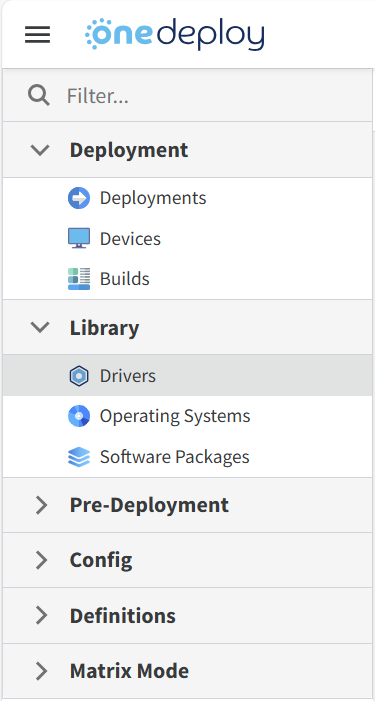
What the Library contains

The Library is divided into the following sections:

Operating Systems

Operating Systems are required for all builds.  They form the base of a build and must exist in the Library before a build can be created.

Drivers

Drivers are optional.  They are not hard-coded into builds.

Instead, drivers are applied dynamically at deployment time, based on the hardware of the device the build is being deployed to. This ensures the correct drivers are used for each device.

Software Packages

Software Packages are optional.  They are added to builds to install applications and supporting software during deployment.

How Library items are used

Once items have been added to the Library:

  • Operating Systems and Software Packages become selectable components of builds
  • Drivers are automatically matched and applied during deployment based on target hardware
  • Builds can then be created and deployed using these Library items

Managing the Library

Within the Library section, you can:

  • Add new Operating Systems, Drivers, and Software Packages
  • Update existing Library items
  • Remove items that are no longer required

Changes made in the Library affect what is available when creating and deploying builds.

Common questions

Do I need all Library sections to create a build?

No.  An Operating System is required, but Drivers and Software Packages are optional.

Why aren’t drivers added directly to builds?

Drivers are applied dynamically during deployment so that the correct drivers are used for the specific hardware being deployed to.

Can I change Library items after creating builds?

Yes.  You can add, update, or remove Library items at any time. Availability of items will affect future build creation and deployments.

Related articles

  • Operating Systems
  • Drivers
  • Software Packages
Updated on February 10, 2026

What are your Feelings

Library OverviewLibrary Overview
  • hello@onedeploy.com
  • UK:+44 1462 514624/ US:+1 415 907 7314

Copyright 2026 OneDeploy Ltd Privacy Policy Cookie Policy